Blood Pressure Monitor Not Showing a Pulse? What to Check
If your blood pressure monitor is not showing a pulse, learn how to separate a failed reading from a display, cuff, power, or rhythm issue.
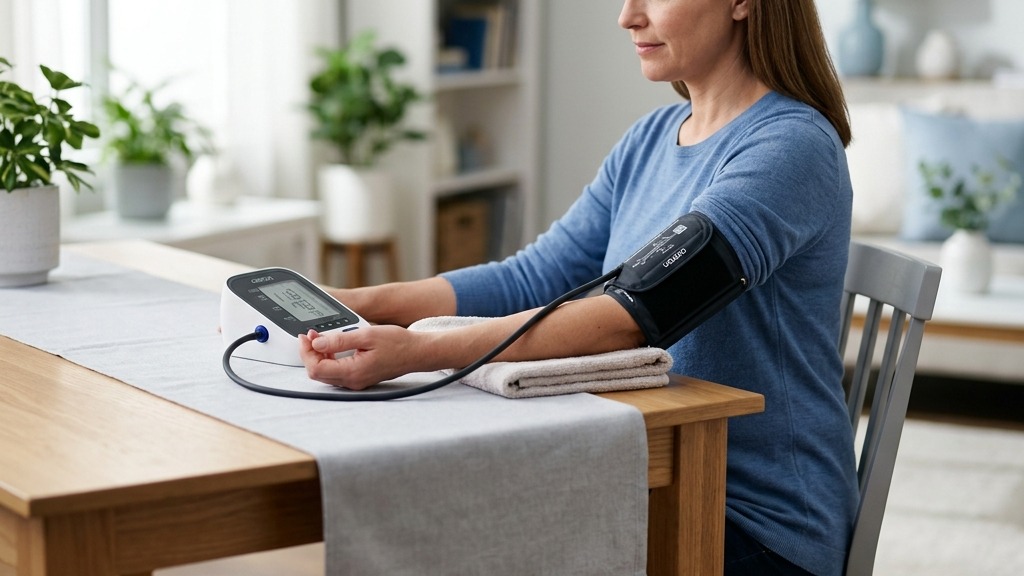
If your blood pressure monitor is not showing a pulse, learn how to separate a failed reading from a display, cuff, power, or rhythm issue.
If your blood pressure monitor is not showing a pulse, first look at whether it completed the blood pressure measurement. An error code or blank result means the monitor did not obtain a usable reading. If systolic and diastolic values appear but the pulse field is blank, check the screen mode and the exact model manual before assuming the device failed.
A missing pulse number does not mean your heart stopped or prove that your pulse is medically abnormal. Automatic monitors estimate pulse from pressure changes inside the cuff. Movement, cuff problems, weak power, an irregular signal, or a display issue can interrupt that process.
Blood pressure monitor not showing a pulse: the quick answer
Do not enter a blank pulse as zero or treat an error screen as a completed reading. Save what the display showed, remove the cuff, and check these basics:
- whether SYS and DIA values appeared
- whether the screen shows an error, low-battery, movement, or irregular-heartbeat symbol
- whether you are viewing a live result, a stored reading, or an average screen
- whether the cuff fits, lies on bare upper arm, and connects firmly
- whether you moved, talked, clenched your hand, or held your arm up
- whether the complete battery set is fresh or the approved adapter is connected
Then rest quietly and make one careful repeat. If the monitor again cannot display a complete result, stop chasing readings and use the troubleshooting route in the manual for the full model number.
First identify what is actually missing
Small LCD screens make several different problems look similar. The distinction changes what you should do next.
| What the screen shows | What it usually tells you | Useful next step |
|---|---|---|
| No SYS, DIA, or pulse; only an error | The measurement failed | Preserve the code and check cuff, movement, air connection, and power |
| SYS and DIA appear, but no pulse value | The reading view, display, or pulse calculation needs checking | Confirm the PUL field and screen mode in the manual; repeat once carefully |
| A pulse number appears with a flashing heart | The icon may be a beat indicator or an irregular-rhythm alert | Match the exact icon to the manual instead of guessing from its shape |
| A stored or average value is on screen | You may not be looking at the latest measurement | Check the user, memory index, date, and time |
| Part of a digit is missing or the screen flickers | The display or power may be unreliable | Replace the full battery set; stop using an ambiguous display |
If a complete pulse number is present and you want to interpret it, see our guide to what pulse means on a blood pressure monitor. A missing number is a different problem: you first need to establish whether the measurement finished normally.
Why an automatic blood pressure monitor may miss the pulse signal
Automatic upper-arm monitors generally use the oscillometric method. They sense tiny pressure oscillations created by arterial pulses while cuff pressure changes, then apply a model-specific algorithm to estimate systolic pressure, diastolic pressure, and pulse. The American Heart Association’s scientific statement on blood pressure measurement explains the role of validated oscillometric devices in automated measurement.
Several things can make that cuff signal too noisy or incomplete.
Movement, talking, or muscle tension
The monitor is trying to separate pulse-related oscillations from other pressure changes. Shifting your arm, talking, coughing, tightening your shoulder, or clenching your hand can add noise. An unsupported arm can also make you tense without noticing.
The American Heart Association’s home-monitoring guidance advises at least 5 minutes of quiet rest, no talking or phone use, and an arm supported at heart level. Those steps are not just for a better blood pressure number; they also give the monitor a cleaner measurement cycle.
Cuff fit, placement, or air-path trouble
A cuff that is too loose, outside its stated arm range, twisted, or partly over clothing may not transmit pressure changes as intended. A loose air plug, kinked tube, leaking bladder, or worn fastener can cause a similar failure.
Check the printed cuff range against your measured upper-arm circumference. Apply it to bare skin in the location shown by the manual, keep the fabric smooth, and seat the connector by holding the plug rather than pulling the hose. Do not patch an inflatable cuff or substitute a cuff merely because its connector fits.
Weak or unstable power
A screen may light even when the batteries cannot reliably run the pump and measurement electronics. Weak power more often causes a failed cycle, dim screen, restart, or error than a predictable false pulse value. Replace all batteries together with the specified type, or use only the adapter approved for that monitor.
If digits remain faint, frozen, or incomplete after fresh power, follow the more specific steps for a blood pressure monitor display that is not working. Never reconstruct a missing digit from what you expected to see.
A model-specific error or display mode
Error labels are not standardized across brands. One official Microlife BP B3 Comfort PC instruction manual, for example, defines “Err 1” as cuff pulse signals that are too weak, “Err 2” as a signal affected by movement or muscle tension, and “Err 5” as an inaccurate signal from which no result can be displayed. Those definitions apply to that manual, not automatically to another model.
Use our broader blood pressure monitor error-code guide to sort the likely problem, but use the exact manual to decode the letters, numbers, and icons on your own screen.
How to repeat the measurement without chasing a result
Use one controlled reset rather than pressing Start repeatedly:
- Let the cuff deflate and remove it. Stop if it remains inflated, becomes sharply painful, or does not release through the documented stop procedure.
- Save the evidence. Photograph the full screen and note the code, icon, user profile, power source, and point in the cycle when it stopped.
- Check the manual’s display diagram. Confirm where PUL should appear and whether you were in measurement, memory, average, guest, or settings mode.
- Stabilize the power. Install a complete fresh battery set or use the approved adapter. Preserve important stored readings before removing power.
- Inspect the outside of the setup. Confirm cuff size, smooth placement, tube condition, and a firmly seated connector. Do not open the monitor or cuff.
- Reset your position. Sit with back supported, feet flat, legs uncrossed, and the bare cuffed arm relaxed on a stable surface around heart level.
- Rest quietly for at least 5 minutes. Do not talk, scroll, brace, or hold your breath.
- Take one new measurement. Watch whether the cuff completes a normal inflate-and-deflate cycle and whether SYS, DIA, and pulse all appear.
- If it completes normally, take the planned repeat. The AHA recommends two readings about 1 minute apart for home monitoring. Record both rather than selecting only the more reassuring result.
If the second attempt fails, note the failure and stop for the session unless your clinician has given you a different plan. Repeated squeezing can make the arm sore and increase anxiety without revealing the cause.
Can an irregular rhythm prevent a pulse reading?
It can make automated measurement more difficult for some devices, but a missing pulse field cannot tell you whether an arrhythmia is present. Movement and cuff problems can create an irregular-looking signal, while a genuine irregular rhythm can affect how consistently an oscillometric algorithm estimates pressure and pulse.
A 2019 systematic review of automated blood pressure measurement in atrial fibrillation found substantial differences among devices and concluded that performance should be considered device by device. An atrial-fibrillation detection feature also did not prove that the device measured blood pressure more accurately during atrial fibrillation.
That evidence supports a cautious rule: do not diagnose rhythm from one blank field, one error, or one heart icon. If a monitor repeatedly misses the pulse or shows an irregular-heartbeat alert during well-taken readings, preserve the pattern and discuss it with a qualified clinician. Our guide to the irregular-heartbeat symbol on a blood pressure monitor explains how to separate the alert from a diagnosis.
When to stop troubleshooting
Contact the manufacturer or stop relying on the monitor when:
- it repeatedly fails to show a complete result with the correct cuff and fresh approved power
- the same pulse or signal error returns despite still, quiet technique
- the screen has missing segments, freezes, restarts, or changes modes unexpectedly
- the pump, cuff, tube, connector, button, battery compartment, or adapter port is damaged
- the problem began after a drop, spill, extreme storage, or unapproved accessory change
- the cuff inflates abnormally, becomes painful, or does not deflate normally
- the manual does not explain the screen behavior
Bring the monitor, cuff, manual, and a short log of failed and successful attempts to a clinician if the problem may affect a clinician-requested monitoring plan. Do not change medication timing or dosage because the device omitted a pulse value.
Symptoms matter more than the display. Seek urgent medical help for chest pain, severe shortness of breath, fainting, new confusion, one-sided weakness, trouble speaking, or other severe new symptoms instead of repeatedly trying to obtain a home reading.
FAQ
Q: Does a blank pulse field mean I have no pulse?
A: No. It usually means the monitor did not display or calculate a pulse value in that screen or measurement. Check whether SYS and DIA appeared, preserve any code or icon, confirm the screen mode in the exact manual, and repeat once with careful setup. Severe symptoms require medical help regardless of the display.
Q: Can low batteries make a blood pressure monitor miss the pulse?
A: Weak power can interrupt inflation, dim or reset the screen, or prevent a complete result. It does not prove that a missing pulse is a battery problem. Replace the complete battery set with the specified type, then repeat under standard conditions.
Q: Should I record a failed pulse reading as zero?
A: No. Zero would be a medical value the monitor did not provide. Note “no pulse displayed,” the error code or icon, and whether SYS and DIA appeared. Keep the failed attempt out of the numerical average.
Q: What if the monitor shows blood pressure but no pulse every time?
A: Confirm that the model is designed to show pulse in that view, then check fresh power, display segments, cuff fit, placement, and technique. If the pulse field stays blank, contact the manufacturer and bring the device to a clinician rather than relying on incomplete results.
Bottom line
A blood pressure monitor that does not show a pulse has not diagnosed an absent or abnormal heartbeat. First determine whether the whole measurement failed, the pulse field alone is missing, or you are viewing a different screen. Correct the cuff, movement, power, and mode, then make one careful repeat. Recurring failures need model-specific support and, when the pattern could be clinical, a clinician’s review.
If incomplete results or recurring signal errors make your current monitor unreliable for routine logs, compare validated upper-arm options with clear displays and supported cuff ranges:
This article is educational and not medical advice. Consult a qualified clinician before making treatment decisions or changing medication based on home blood pressure readings.
Top 5 picks
Best Blood Pressure Monitors For Seniors 2026
Five upper-arm monitors ranked with published scorecards—setup friction, comfort, readability, power convenience, and repeatable accuracy—so you can compare models before you buy.
See our Top 5 blood pressure monitor picksHome-monitoring advice is only useful if it is easy to verify and act on correctly.
We write explainers to be understandable to readers, search engines, and AI answer systems.
Compare our Top 5 blood pressure monitor picks for 2026, then track readings over time with consistent technique.


