Can You Use a Blood Pressure Monitor With a Pacemaker?
Using a blood pressure monitor with a pacemaker? Check model restrictions, reading limitations, and what to ask your pacemaker clinic before home monitoring.
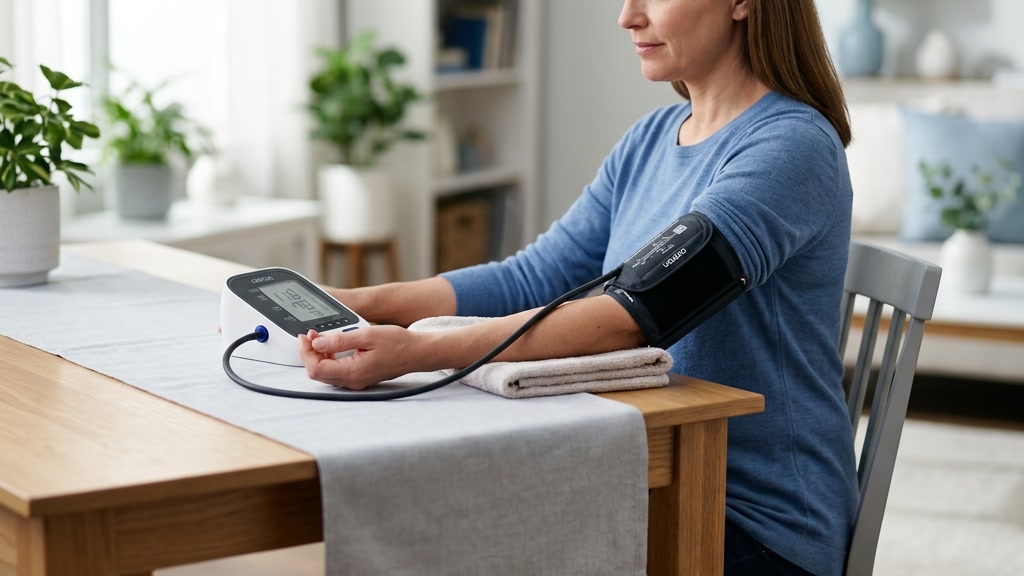
Using a blood pressure monitor with a pacemaker? Check model restrictions, reading limitations, and what to ask your pacemaker clinic before home monitoring.
Using a blood pressure monitor with a pacemaker requires a model-specific check—not a blanket yes. Read the exact monitor’s instructions and ask your pacemaker clinic whether that model is appropriate for you. Some automatic monitors explicitly say they are not intended for people with implanted pacemakers or defibrillators.
There are also separate questions about electrical interference, the reliability of the blood pressure reading, and what an on-screen pulse or rhythm alert can tell you. A monitor that displays a plausible number has not answered all three. Here is how to check without experimenting with your equipment or interpreting a cuff as a pacemaker test.
Can you use a blood pressure monitor with a pacemaker?
The answer depends on the monitor, your implanted device, and your clinical circumstances. Start with the monitor’s intended use, warnings, and contraindications rather than a retailer’s feature list.
This distinction matters in practice. The official OMRON BP5465 instruction manual states that the monitor is “NOT intended for use if you have an implanted defibrillator or pacemaker.” Its introduction also says it has not been tested for that population. That is a restriction for this exact model—not a rule about every OMRON monitor or every automatic blood pressure machine.
If your manual contains that restriction, do not ignore it because a different model looks similar, a review recommends the brand, or the monitor has already produced a reading. Ask your clinic to help identify a suitable alternative. If the wording is unclear or you cannot find the official manual, contact the manufacturer before using it.
Do not assume that turning off Bluetooth or a rhythm-detection feature removes an intended-use restriction. A setting change is not permission to use a monitor outside its instructions.
Separate interference, measurement accuracy, and rhythm alerts
These are different checks, and passing one does not establish the others.
Could equipment interfere with the implanted device?
Your implant manufacturer’s safety instructions address electromagnetic interference. For example, Boston Scientific’s pacemaker guidance explains that pacemakers are designed to work around most ordinary appliances, while some electrical and wireless items require precautions or separation.
That general guidance is not an approval of every blood pressure monitor. Follow the instructions for your own implant and monitor. If an app or phone is part of the setup, ask about that too; do not rest a phone over the implant while arranging your reading.
Will this monitor give useful blood pressure readings for you?
An automatic cuff estimates blood pressure from pressure changes associated with blood moving through the artery. Its performance and intended population matter, as do cuff fit and technique.
A pacemaker history should prompt a suitability check, not an assumption that every reading is inaccurate. Equally, general validation does not cancel a manufacturer warning. Our guide to checking a blood pressure monitor’s validation explains how to match the exact model rather than relying on a brand name.
If you also have atrial fibrillation, that adds a separate measurement question. The article on blood pressure monitor accuracy with AFib covers that issue; it should not be treated as evidence that a monitor is appropriate for someone with a pacemaker.
Can the cuff tell whether the pacemaker is working?
A routine blood pressure cuff is not a pacemaker interrogation system. A pulse number or heart-shaped icon cannot show the implant’s battery status, lead function, or programming.
Boston Scientific’s recovery and follow-up guidance describes dedicated remote checks and in-person visits for evaluating pacemaker function. Keep those appointments and use the monitoring system your clinic prescribed. A reassuring blood pressure result is not a substitute.
What to ask your pacemaker clinic before home monitoring
Bring the monitor or its complete model number, the official manual, the cuff size, and your implanted-device identification card. If you already have readings, bring the unedited log too.
Ask these practical questions:
- Is this exact monitor appropriate for me? Point out any warning about pacemakers, implanted defibrillators, arrhythmias, or an untested population.
- Do you want a supervised comparison? A clinician can observe your technique and decide how to assess the monitor’s readings. One matching number at home is not formal validation.
- Which arm should I use? This is especially important after a recent procedure or if you have arm swelling, pain, a wound, a dialysis access, or another restriction.
- How should I record pulse values and rhythm alerts? Ask which changes should prompt a call and how quickly.
- What measurement schedule should I follow? Get a plan for routine readings rather than checking repeatedly whenever you notice a symbol.
After implantation, follow the discharge team’s instructions about arm movement and recovery. Boston Scientific advises that some arm movements and upper-body activities may need limits while healing. Do not invent a permanent “always use the opposite arm” rule from that advice; have your own team choose the measurement approach.
If the clinic needs to clarify a manufacturer restriction, wait for that clarification or use an alternative they recommend. Do not attempt to prove compatibility through repeated cuff inflations.
Once your team confirms the monitor: keep the routine consistent
A suitable monitor still needs ordinary good technique. The CDC’s home blood pressure guidance recommends a quiet seated rest, supported positioning, a bare arm, and a recorded series rather than isolated numbers.
For your agreed monitoring routine:
- Follow the preparation instructions from your clinic and monitor manual. Empty your bladder and sit quietly for at least 5 minutes.
- Support your back, keep your feet flat and legs uncrossed, and support the cuffed arm at chest height.
- Use the approved cuff within its stated arm-size range. Keep still and do not talk during measurement.
- Record the complete blood pressure and pulse values, time, symptoms, and any displayed symbol or error.
- Follow your prescribed repeat-reading schedule. The CDC generally advises at least two readings, 1–2 minutes apart; your clinic may give you a different plan.
Keep failed measurements separate from completed results. An error screen is not a blood pressure of zero. If failures recur with a clinic-approved setup, use our guide to blood pressure monitor error messages to organize the device checks, and tell your clinic about the pattern.
Do not add or subtract a fixed amount from the readings to “correct for” a pacemaker. Do not delete high or low results simply because they look unexpected. Take medication as prescribed; a cuff reading is not a reason to skip, retime, stop, or change a dose on your own.
What if the pulse looks wrong or a heart symbol appears?
Record exactly what the screen shows and check the model’s display diagram. A normal heartbeat indicator, an irregular-heartbeat warning, and a dedicated AFib-screening result are not interchangeable.
Our explanation of the irregular-heartbeat symbol on a blood pressure monitor covers these distinctions. With a pacemaker, do not interpret the presence or absence of a symbol as proof that the implant has failed or is working normally.
Contact your clinic about a new or repeated unexpected pulse pattern, recurrent alerts, or results outside the action limits it gave you. Follow any instructions attached to the implant’s own alert system. Do not spend the day testing different cuff positions or chasing a preferred pulse number.
Symptoms take priority over troubleshooting. Call emergency services for chest pain, severe shortness of breath, fainting, or sudden stroke-like symptoms. Do not wait for another home reading or an on-screen warning before seeking help.
Frequently asked questions
Q: Are all automatic blood pressure monitors suitable for people with pacemakers?
A: No. Some exact models explicitly exclude people with implanted pacemakers or defibrillators. Read the official manual and have your pacemaker clinic confirm an appropriate monitor and measurement plan. Brand reputation, a familiar cuff, or one plausible reading does not override a restriction.
Q: Can I make a restricted monitor suitable by turning off Bluetooth?
A: Do not assume so. Switching off wireless transmission does not remove an intended-use restriction or establish that the blood pressure and rhythm features are appropriate for you. Ask the manufacturer and clinic rather than improvising a workaround.
Q: Does an irregular-heartbeat symbol mean my pacemaker is malfunctioning?
A: The symbol cannot establish that. A blood pressure cuff does not evaluate pacemaker programming, leads, or battery status. Record the result and follow your clinic’s instructions for new or repeated alerts. Seek urgent help for severe symptoms regardless of the displayed numbers.
Q: Should I always use the arm opposite my pacemaker for blood pressure?
A: Do not make that a universal rule. Ask your clinical team which arm to use, especially soon after implantation or when you have swelling, pain, a wound, or another arm restriction. Follow individualized recovery instructions rather than experimenting with cuff placement.
Sources
- OMRON BP5465 instruction manual: intended use and important safety information, EN2–EN6
- Boston Scientific: Pacemaker electromagnetic safety and household equipment
- Boston Scientific: Pacemaker recovery and follow-up
- CDC: Measuring Your Blood Pressure
Bottom line
Using a blood pressure monitor with a pacemaker starts with the exact manual and your pacemaker clinic—not a universal product recommendation. Confirm suitability, respect any restrictions, keep a consistent log, and leave implant checks to the appropriate clinical equipment.
If your team recommends a different monitor, our general upper-arm buying guide can help you compare everyday features. It is not a pacemaker-approved shortlist: have your clinic check the exact model before purchase.
This article is educational and not medical advice. Consult a qualified clinician before making treatment decisions or changing medication based on home readings.
Top 5 picks
Best Blood Pressure Monitors For Seniors 2026
Five upper-arm monitors ranked with published scorecards—setup friction, comfort, readability, power convenience, and repeatable accuracy—so you can compare models before you buy.
See our Top 5 blood pressure monitor picksHome-monitoring advice is only useful if it is easy to verify and act on correctly.
We write explainers to be understandable to readers, search engines, and AI answer systems.
Compare our Top 5 blood pressure monitor picks for 2026, then track readings over time with consistent technique.


